DesignSpark PCB: New Version 13 - NOW AVAILABLE

Skip to main content

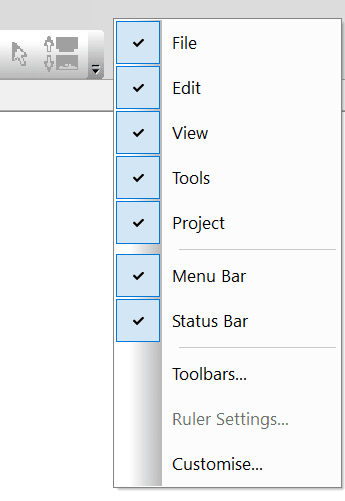
How can I get my toolbars back?

by davecole

This tutorial requires:

DesignSpark PCB V11.0.0

If any of the tools or icons are missing, they may have been disabled. They can simply be re-enabled by a right click on the menu area and reselected as shown.

blobid16_81aebec63ce14146a375a3e7f19f32ae615b8042.png

I'm a Mechanical Engineer by qualification though I worked for a long time specialising in Motion Control systems and integration with various PLC systems. I've wide experience of many types of applications from packaging machines to military and some applications that I can't mention. At home, I like to tinker and make things with wood, metal, plastics, electronics and mechanical system. I'm never happier than with a hammer and a screwdriver in my hands....
DesignSpark Logo

Enjoying DesignSpark?

Create an account to unlock powerful PCB and 3D Mechanical design software, collaborate in our forums, and download over a million free 3D models, schematics, and footprints.
Create an account

Already a DesignSpark member? Log In

Comments